
Kia Rio: Rear Seat / Rear Seat Assembly
Components and components location
| Component Location |
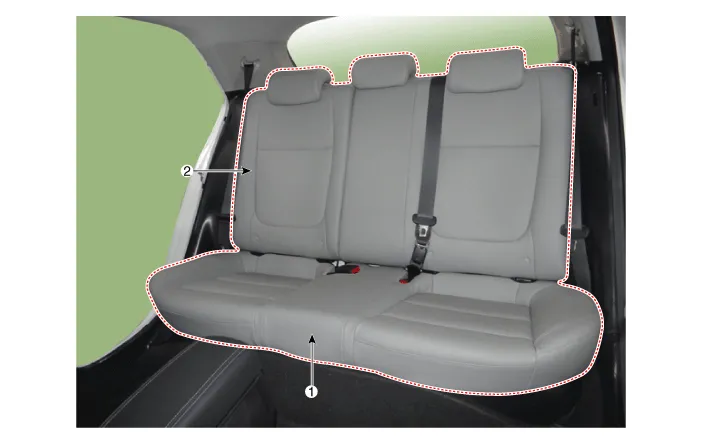
| 1. Rear seat cushion assembly
|
2. Rear seat back assembly
|
Repair procedures
| Replacement |
| 1. |
Remove the rear seat cushion assembly (A) after loosening the bolt.
|

| 2. |
Disconnect the rear center seat belt (A).
|

| 3. |
Open the rear seat center hinge (A) after loosening the mounting bolt.
|

| 4. |
Remove the rear seat back assembly (A).
|

| 5. |
Install in the reverse order of removal. |
Components and components location Components 1. Rear seat cushion pad 2. Rear seat cushion covering 3. Rear seat back covering 4.
Components and components location Component Location 1. Rear seat back cover [LH] 2. Rear seat back cover [RH] Repair procedures Replacement Put on gloves to protect your hands.
Other information:
Kia Rio 2017-2023 YB Service Manual: License Lamps
Repair procedures Removal 1. Disconnect the negative (-) battery terminal. 2. Remove the license lamp assembly (A) after pressing the locking pin. 3. Disconnect the license lamp connector (A).
Kia Rio 2017-2023 YB Service Manual: Power Windows
Components and components location Component Location 1. Driver power window switch 2. Assist power window switch 3. Rear power window switch 4. Front window motor 5. Rear window motor Description and operation Safety Function of Power Window When driver door power win
Categories
- Manuals Home
- Kia Rio Owners Manual
- Kia Rio Service Manual
- Clutch System
- Cooling System
- Steering System
- New on site
- Most important about car
